


In the catalog, columns are collected in four groups: «Main», «GEO», «Ahrefs» and «Majestic». Below is what each column shows and how to read its values. Which columns you see depends on your plan, and how many of them are shown at once depends on your settings (Catalog settings).
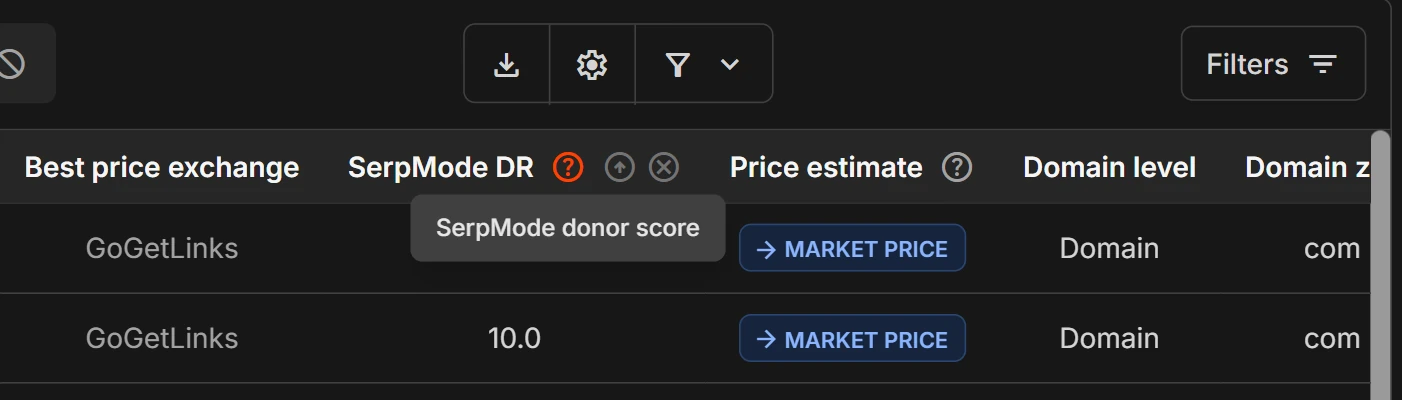
«?» hints
Next to the names of many columns there is a «?» sign. Hover over it, and a short explanation appears. For example, the «Best price» column has the hint «Minimum price across all exchanges». The «SerpMode DR» column has: «SerpMode donor score».
The «Main» group
| Column | What it shows | How to read it |
|---|---|---|
| «Domain» | The name of the donor site. It is a link to the site itself | Pinned, always first. To the right of the name are the history, favorites and blacklist icons |
| «Where to buy?» | Icons of the exchanges where the donor is sold | Clicking an icon opens the donor on the exchange in a new tab (more). The column cannot be switched off, but it can be moved |
| «Topic» | The site’s main topic as a badge. If the site has several topics, the edge of the next badge is visible, and the full list appears in a tooltip when you hover over it | SerpMode determines the topic. In the Excel export, topics come in the same order, the main one first |
| «Site type» | The site type, a gray badge: blog, online store, media, forum and others | SerpMode determines the site type |
| «Site age» | Age in whole years | More: «Domain age and registration date» |
| «Yandex IKS» | Yandex’s site quality index | Only for sites from CIS countries |
| «Best price» | The lowest price among the exchanges | The price is as of the catalog update date. Check the current price on the exchange. See Exchange prices and «Best price» |
| «Best price exchange» | The exchange where this price is | The exchange name. Icons in the «Where to buy?» column lead to the donor on the exchange (more) |
| «SerpMode DR» | The donor score on a scale from 0 to 10 with one decimal place | SerpMode’s score, not a recommendation. More: The SerpMode DR score |
| «Price estimate» | The «Below market», «Market price», «Above market» or «No estimate» label: the best price compared with the prices of similar sites | SerpMode’s estimate, not a recommendation. More: «Price estimate: overpriced or fair market» |
| «Domain or subdomain» | «Domain» or «Subdomain» | More: «Domains and subdomains» |
The «GEO» group
| Column | What it shows |
|---|---|
| «Domain zone» | The domain zone, for example ru or com |
| «Country» | The country of the site. SerpMode determines the country |
| «Region» | The world region: Asia, Africa, Middle East, Europe, Latin America, Oceania, CIS, North America |
| «Language» | The language of the site. SerpMode determines the language |
More: «Zone, country, region and language of a site».
The «Ahrefs» group
This is data from the Ahrefs service as of the catalog update date.
| Column | What it shows |
|---|---|
| «Ahrefs DR» | The DR (Domain Rating) metric |
| «Ahrefs links» | The number of links to the domain |
| «Ahrefs DoFollow links», «Ahrefs NoFollow links» | The number of links of each kind |
| «% Ahrefs DoFollow links», «% Ahrefs NoFollow links» | The share of links of each kind. The % sign is in the header, the cell has only a number |
| «Ahrefs Domains» | The number of referring domains |
| «Ahrefs Domains DoFollow», «Ahrefs Domains NoFollow» | The number of referring domains of each kind |
| «% Ahrefs Domains DoFollow», «% Ahrefs Domains NoFollow» | The share of domains of each kind |
| «Ahrefs traffic» | The traffic estimate |
| «Traffic trend» | How Ahrefs traffic changed over 12 months: «Strong growth», «Growth», «Stable», «Decline», «Strong decline», «Unstable» or «Not determined». More: «Traffic trend: is the site growing or declining» |
The default column set includes five columns of the group: «Ahrefs DR», «Ahrefs traffic», «Traffic trend», «Ahrefs Domains» and «% Ahrefs Domains DoFollow». The others are switched on in «Catalog settings». Which Ahrefs metrics are open depends on your plan.
The «Majestic» group
This is data from the Majestic service as of the catalog update date. The columns: «Majestic TF» (Trust Flow), «Majestic CF» (Citation Flow), «Majestic TF/CF», «Majestic domains», «Majestic links», «Majestic IP», «Majestic subnets», «Majestic EDU domains», «Majestic GOV domains». The default column set includes «Majestic TF», «Majestic CF», «Majestic TF/CF» and «Majestic subnets»; the others are switched on in «Catalog settings». Which metrics are open depends on your plan.
Empty cell, zero and dash
Empty cells show a dash «—». A dash and a zero mean different things. More: «Empty value, zero and dash».
If you don’t see a column
- Columns that are not in your plan are not shown.
- The column may have been switched off in «Catalog settings». Switch it on with the checkbox. How many columns can be shown at once depends on your plan (more).
- The «Domain» and «Where to buy?» columns cannot be switched off.
About data accuracy
The metrics in the catalog are estimates from third-party services as of the catalog update date, not measurements.