


The «Traffic trend» column shows how a donor’s Ahrefs traffic has changed over the last 12 months. A growing site stands out right away, and a declining one is easy to skip without opening the domain history.
The column and the filter are available only on plans with the «Traffic trend» feature, currently «Agency». They are also available during the free trial.
What the statuses mean
The status compares the traffic of the last three months with the earlier level. The tooltip at the column header says the same.
| Status | Meaning |
|---|---|
| Strong growth | Traffic has grown several times over |
| Growth | Traffic has grown noticeably |
| Stable | Traffic stays at about the same level |
| Decline | Traffic has dropped noticeably |
| Strong decline | Traffic has dropped several times over |
| Unstable | Traffic jumps from month to month without a clear trend |
| Not determined | There is too little traffic history yet, or traffic is too low to judge the trend |
The status describes what has already happened and does not predict how traffic will behave next. It is an estimate based on Ahrefs data as of the catalog update date.
How to read the tooltip
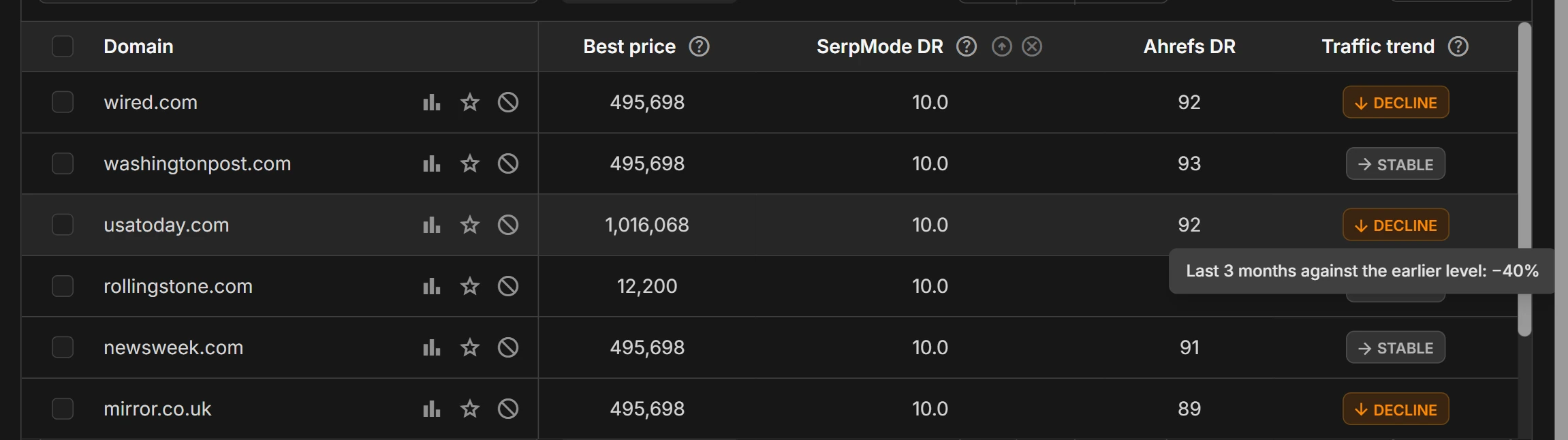
Hover over the label. The tooltip shows by what percentage the traffic of the last three months is above or below the earlier level, for example «Last 3 months against the earlier level: −62%». For Unstable, the tooltip also has the line «Traffic jumps without a clear direction».
A single spike or dip does not change the status: it looks at the traffic level over several months, not at a single month.
When the status is updated
The status is recalculated when fresh Ahrefs traffic is loaded into the catalog, that is, about once a month. Read more on the page «Where the data comes from and how often it is updated».
How to select growing donors
- Open «Tools → Exchange aggregator» and click «Filters».
- In the «Traffic trend» filter, select the statuses you need, for example «Strong growth» and «Growth». If you select several, any of them will match.
- Click «Apply».
To exclude declining donors, select all statuses except «Decline» and «Strong decline».
To sort donors by the percentage of traffic change, click the «Traffic trend» column header. Donors with Not determined stay at the end in either sort direction.
In the Excel export, the status is written in words, for example «Growth» or «Not determined».