


An export is saved as a table in XLSX format. It includes all the columns that your plan opens. A ready file is kept for 7 days.
What is inside the file
- Format. The file comes only in XLSX format. The file name is
serpmode-YYYYMMDD-HHMMSS.xlsx, that is, the date and time of creation. - Columns. All the columns of your plan. The set of columns you set up on the screen does not narrow the file (catalog settings).
- Headers are the same as on the screen.
- The language of the file matches the interface language at the moment you start the export. Topics, country, region and language of the site are also labeled in this language.
- The order of rows is the same as on the screen.
How the file is formatted
- The first row is pinned and bold, and the columns have a filter turned on.
- Dates are written like «Sep 13, 2026» in an English file and as DD.MM.YYYY in a Russian one.
- Lists, for example topics, are separated with « / ».
- The exchange name in the «Best price exchange» column works as a link to the donor on that exchange (going to the exchange).
- The site age is given in whole years.
- Numbers are written as numbers, so you can add and sort them. The spaces between digit groups and the decimal separator depend on the settings of your Excel.
- The column width is adjusted to the content.
- The highlighting of indicators is carried over to the file: the same colors and the same thresholds as on the screen (indicators).
Values that start with «=», «+», «-» or «@»
Such values are written to the cell as text. This protects against formulas: Excel will not run such an entry.
Export history
At the bottom of the exports page there is the «Export history» block with the note «Files are kept for 7 days».
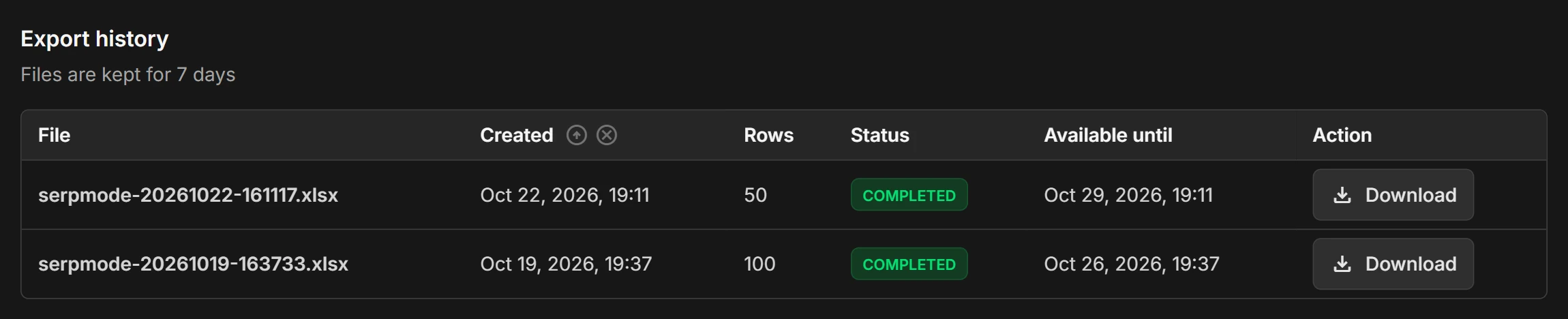
The columns of the list:
- «File»: the file name;
- «Created»: the date and time of creation, for example «Oct 22, 2026, 19:11»; you can sort by this column;
- «Rows»: how many rows are in the file;
- «Status»;
- «Available until»: the creation date plus 7 days;
- «Action»: the «Download» button.
Statuses:
- «Building»: the file is being built, and the page refreshes by itself. Until the file has a name, the row shows «—»;
- «Completed»: the file can be downloaded with the «Download» button;
- «Expired»: the file was deleted after 7 days of storage, and there is no «Download» button.
When the storage period ends, the file is deleted, but the row stays in the list, so you can see that the export took place. You need a new export: it will deduct rows from the limit again (export limit).
You can download only your own files. When your access has ended, you cannot download the file even if the storage period has not expired: exports are closed until payment (subscription end).
If the file does not open
- Open it in Excel or another spreadsheet program that understands the XLSX format.
- If the export failed, start it again (how to export). Rows are not deducted from the limit for a failed export.
- If the error repeats, write to support@serpmode.com.