


If auto-renewal is on, when the last paid period ends SerpMode buys the next period of the same plan and the same duration. You can turn auto-renewal off at any time: with the switch, by deleting the card, or by emailing info@serpmode.com.
How auto-renewal works
- The same plan is renewed for the same term. If you bought another plan in advance, auto-renewal runs after it and renews that plan.
- The internal balance is used first; the missing amount is charged to the primary linked bank card.
- The amount equals the plan price on the renewal day. If the price goes up, we write to you by email at least 14 days before. The new price does not apply to a period you have already paid for.
- The trial period is not renewed.
By turning on auto-renewal with a linked card (or by linking a card while auto-renewal is already on), you agree to charges for the next period. Linking a card by itself, including for the trial period, is not consent to charges.
How to turn it on
- Open «Account → Payments and subscription» and find the «Your cards» block.
- If there is no card, click «Add card» and link it on the YooKassa page. No money is charged when you link it.
- Turn on the «Auto-renewal» switch.
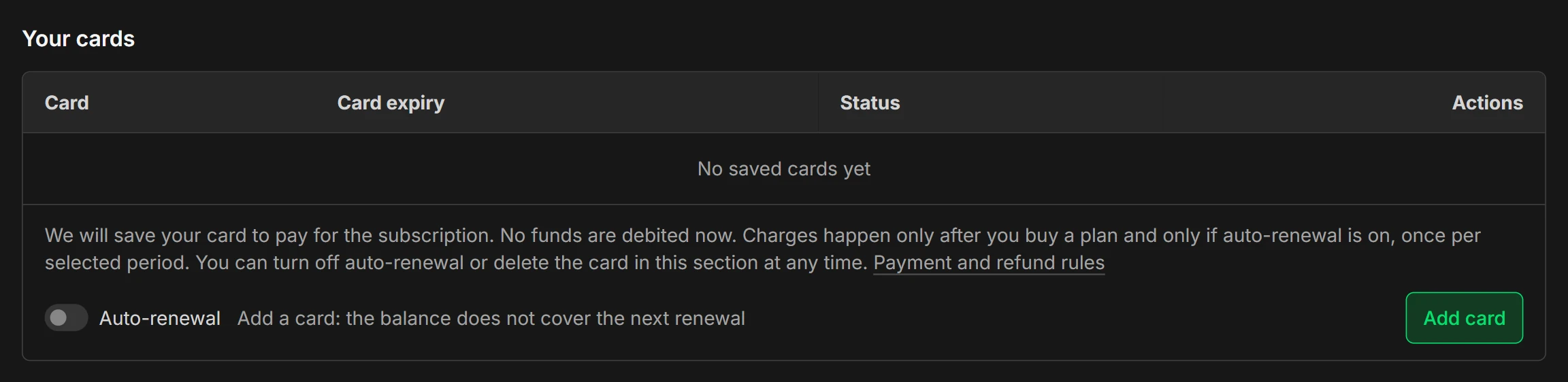
To turn it on, you need a primary card or an internal balance that covers the next renewal. Otherwise the switch is inactive and the reason is written next to it.
When auto-renewal is on, the date is shown under the switch: «The next period will be paid automatically on {date}. You can turn this off at any time».
Reminders
3 days and 1 day before the period ends, we send a reminder with the approximate amount by email: we calculate the exact amount in rubles at the rate on the day of the charge. If the bot @serpmode_notify_bot is connected, the reminder also comes in Telegram. Emails come from noreply@serpmode.com.
How to turn it off
Any of these ways:
- the «Auto-renewal» switch in the «Your cards» block;
- deleting the card in the same block: after it is deleted, nothing is charged to it;
- an email to info@serpmode.com from the account address.
After you turn it off, access remains until the end of the paid period. Turning off auto-renewal is not withdrawal from the agreement, so money for the current period is not refunded. To get money back for unused time, withdraw from the agreement: Refunds and canceling your subscription.
You can also turn off auto-renewal after the term has ended, while charge attempts continue.
If a charge fails
We send an email with the reason for the decline and the date of the next attempt, and retry once a day, but no longer than three days after the period ends. Until a charge succeeds, the catalog and exports are closed. When the charge succeeds, the new period starts from that moment. If there is no card or the charge has not succeeded within three days, auto-renewal is not performed. You do not have to wait: you can buy the plan manually, see the page «How to pay for a subscription».