


The «Price estimate» column compares a donor’s «Best price» with the prices of similar sites and adds a label: ↓ Below market, → Market price or ↑ Above market. This way you can see whether a price is inflated before you buy.
The column and the filter are available only on plans with the «Price estimate» feature, currently «Agency». They are also available during the free trial.
What the labels mean
| Label | Meaning |
|---|---|
| ↓ Below market | Similar sites usually cost more. Check this donor first |
| → Market price | A typical price for sites with these metrics |
| ↑ Above market | Similar sites are usually cheaper. It makes sense to look for an alternative |
| No estimate | There is not enough data for an estimate yet |
How to read the tooltip
Hover over the label. The tooltip has four lines:
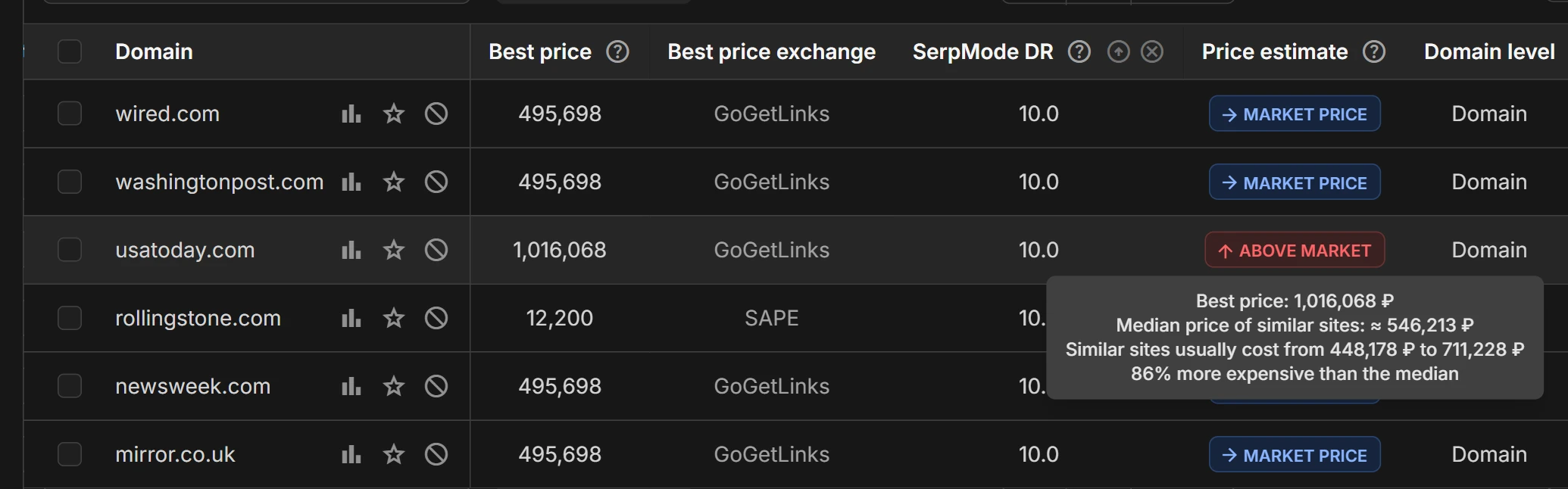
- «Best price»: the donor’s price that SerpMode estimates.
- «Median price of similar sites»: half of similar sites cost less, half cost more.
- «Similar sites usually cost from … to …»: the price range of 8 out of 10 similar sites.
- «more expensive than the median» or «cheaper than the median»: by what percentage or how many times the best price differs from the median, for example «86% more expensive than the median».
Example from catalog data as of October 2026: usatoday.com has a best price of 1,016,068 ₽, the median price of similar sites is about 546,213 ₽, and similar sites usually cost from 448,178 to 711,228 ₽. The price is above the usual range and 86% more expensive than the median, so the label is ↑ Above market.
If the No estimate label has the tooltip «Similar sites cost too differently: from … to …», the prices of similar sites are spread so widely that no single market price can be named.
How the estimate works
- The estimate comes from a machine learning model. It takes 16 features of a donor into account and works out how much sites with similar metrics usually cost on link exchanges.
- The donor’s price, its exchange and the «SerpMode DR» score are not part of the comparison. Similar sites are matched by the site itself, not by where and for how much it is sold.
- ↑ Above market and ↓ Below market appear only when the best price is outside the usual range and differs noticeably from the median. With a small deviation, the label stays → Market price.
- The model is retrained on new data every month. Estimates are recalculated when prices and metrics change in the catalog.
The price estimate is a guideline, not a recommendation to buy or to pass. Check the current price and availability of the site on the exchange.
How to find donors by estimate
- Open «Tools → Exchange aggregator» and click «Filters».
- In the «Price estimate» filter, select the values you need, for example «Below market». If you select several, any of them will match.
- Click «Apply».
To sort donors by how far their price is below or above the median, click the «Price estimate» column header.
In the Excel export, the estimate is written in words: «Below market», «Market price», «Above market» or «No estimate».